Sales Enablement Tools Every B2B Team Expanding into Asia Should Use
A practical tool stack for improving execution, visibility, follow-up, and conversion across new Asian markets
Expanding into Asia is not only a market-entry challenge.
It is also an execution challenge.
Your team may need to research new accounts, map unfamiliar buying committees, manage outreach across time zones, qualify leads, schedule meetings, follow up quickly, prepare localised content, track pipeline, and learn which markets respond.
Without the right tools, the process becomes messy fast.
Sales reps work from spreadsheets.
Marketing cannot see which accounts are active.
SDRs forget follow-ups.
AEs enter meetings without context.
Managers cannot tell which market is producing real pipeline.
Leadership sees activity but not enough clarity.
That is why sales enablement tools matter.
The goal is not to buy more software.
The goal is to build a practical system that helps your team:
- identify the right accounts;
- engage the right buyers;
- follow up consistently;
- qualify leads properly;
- prepare better conversations;
- track pipeline clearly;
- learn faster by market.
Salesforce’s 2024 State of Sales coverage reported that 83% of sales teams using AI saw revenue growth, compared with 66% of sales teams not using AI, which reinforces the growing role of AI-enabled tools in modern sales execution. LinkedIn also positions Sales Navigator around helping sellers find leads, save time, and win deals, while highlighting buyer signals, CRM efficiency, and relationship intelligence as benefits for sales teams.
But tools only help when they support a clear sales process.
This guide explains the sales enablement tools every B2B team expanding into Asia should consider—and how to use them without creating a bloated, confusing tech stack.
- TL;DR — Key Takeaways
- Do not start with tools. Start with the sales process. Tools should support your ICP, outreach motion, qualification standards, and reporting needs.
- A CRM is the foundation. Without clean account, contact, activity, and pipeline data, every other tool becomes less useful.
- Prospect data tools help you build market coverage. They should be used with verification, segmentation, and clear data governance.
- LinkedIn and sales intelligence tools are critical for Asian expansion. They help map buyers, understand account context, and find warm paths into target accounts.
- Outreach tools create consistency. They help manage email, LinkedIn, calling, sequences, and follow-up discipline.
- Content and collateral tools help buyers decide. Localised decks, one-pagers, case studies, and ROI materials can reduce friction.
- Call intelligence and meeting tools improve coaching and handoff.
- Analytics tools help separate activity from pipeline quality.
- AI tools can improve research, drafting, scoring, summarisation, and prioritisation—but they do not replace sales judgement.
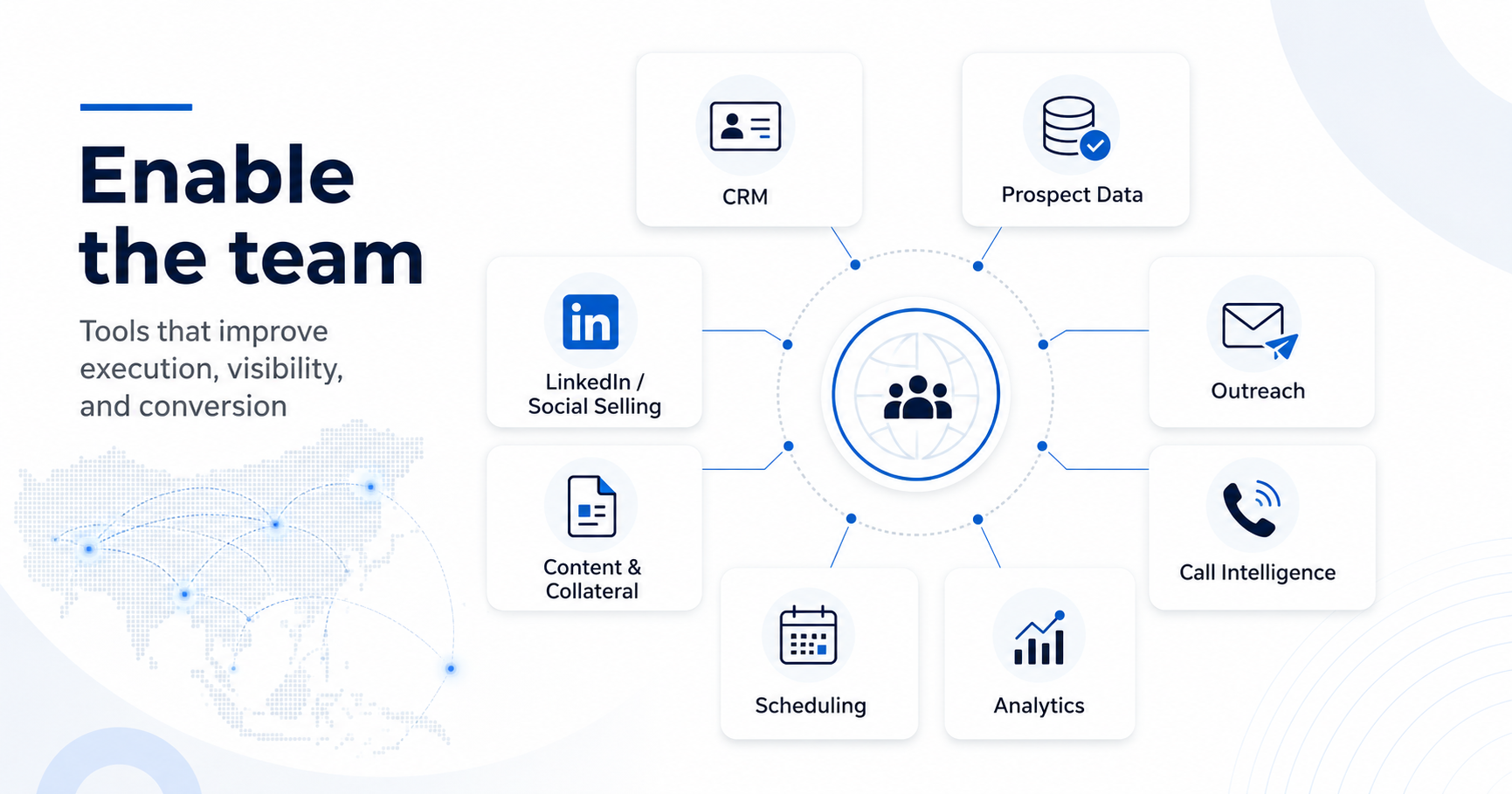
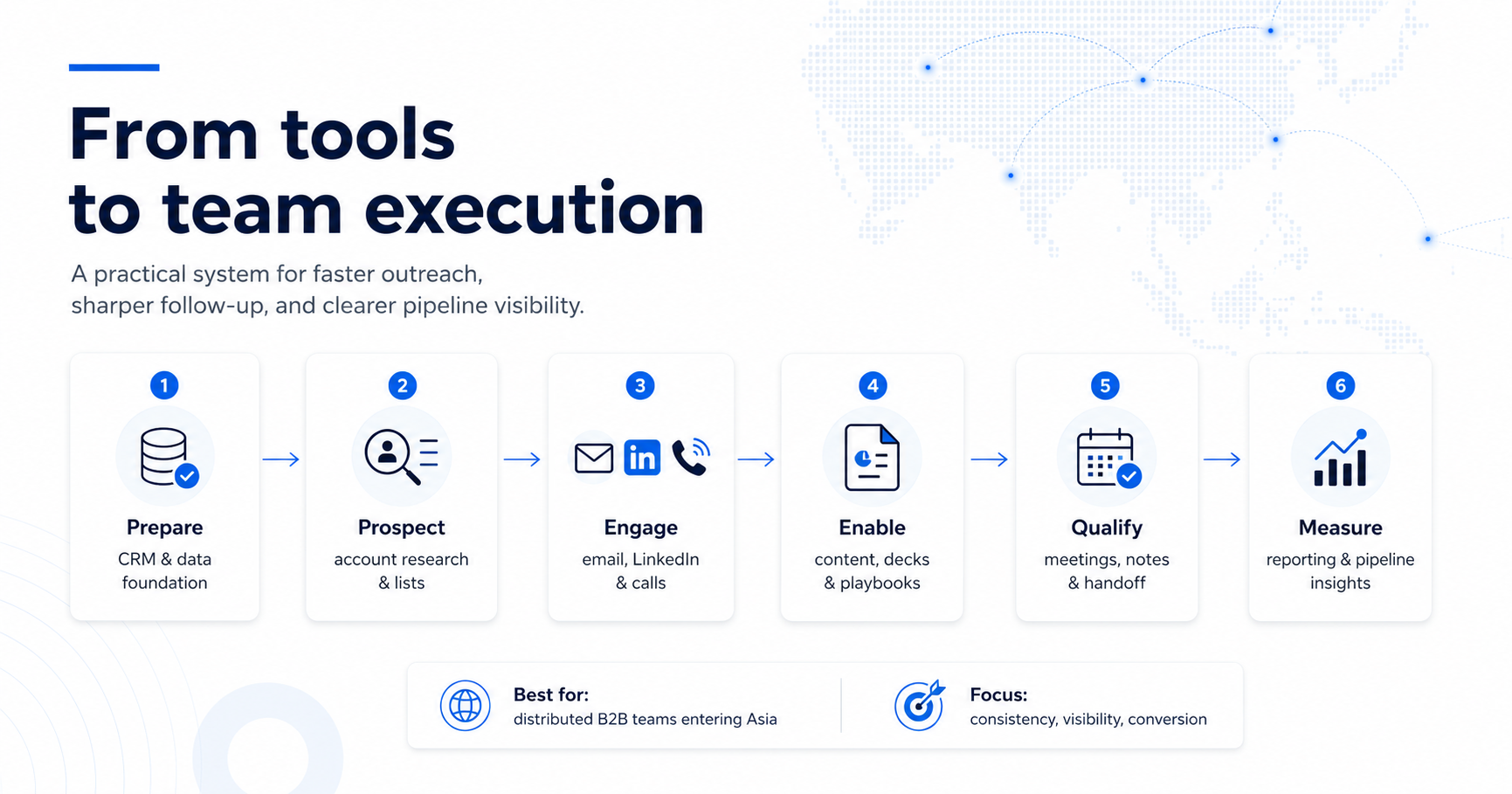
If you only do one thing: build a simple tool stack around CRM, prospect data, LinkedIn, outreach, scheduling, content, call intelligence, and reporting before adding advanced automation.
Who This Comparison Is For (and Not For)
This Guide Is For
- B2B companies entering Asian markets for the first time.
- Sales teams expanding into Singapore, ASEAN, India, Japan, Korea, Australia, or wider APAC.
- Founders and CEOs building a lightweight sales system before hiring a larger regional team.
- CROs and sales directors improving sales productivity across multiple countries.
- SDR and BDR teams managing outbound prospecting, follow-up, and meeting qualification.
- RevOps leaders creating CRM structure, reporting, routing, and pipeline visibility.
- Marketing teams supporting sales with content, webinars, lead capture, and enablement assets.
- B2B SaaS, cybersecurity, cloud, MSP, fintech, HR tech, healthtech, data, AI, and professional-services companies.
This guide is especially useful if your team struggles with:
- scattered prospect data;
- poor CRM hygiene;
- unclear ownership;
- slow follow-up;
- weak meeting handoff;
- inconsistent outreach;
- limited market visibility;
- no clear view of which Asian market is producing real pipeline.
This Guide Is Not For
This guide may be less useful if:
- your sales motion is fully self-serve;
- you do not have a defined ICP;
- your team is not ready to maintain CRM discipline;
- you only want a list of software names without process design;
- your team has very low sales volume and can manage everything manually;
- you expect tools to fix weak positioning, weak targeting, or poor follow-up;
- your company is not prepared to train users and enforce adoption.
Practical fit check: Tools should make a good sales process easier to execute. They will not rescue an unclear market-entry strategy.
Why Sales Enablement Tools Matter in Asian Expansion
Asian expansion creates operational complexity.
Your team may be selling across:
- different countries;
- different languages;
- different buyer roles;
- different time zones;
- different procurement expectations;
- different communication norms;
- different levels of brand awareness.
A simple spreadsheet might work for the first 20 accounts.
It will not support a repeatable regional sales motion.
What Tools Should Help With
| Sales Challenge | Tool Support Needed |
|---|---|
| Finding the right accounts | Prospect data, LinkedIn, sales intelligence |
| Mapping decision-makers | Sales Navigator, CRM, account research tools |
| Managing outreach | Sequencing, email, LinkedIn, calling tools |
| Following up consistently | CRM tasks, sequences, reminders, automation |
| Booking meetings | Scheduling tools, calendar integrations |
| Preparing conversations | Research, AI summaries, account notes |
| Handling buyer objections | Sales content, case studies, ROI tools |
| Improving calls | Call recording and conversation intelligence |
| Measuring progress | Dashboards, CRM analytics, pipeline reports |
The point is not to create a complicated stack.
The point is to reduce friction between market interest and qualified pipeline.
Tool Category 1 — CRM and Pipeline Management
Your CRM is the foundation of the sales enablement stack.
If your CRM is messy, every other tool becomes harder to use.
What the CRM Should Do
A good CRM should help your team manage:
- companies;
- contacts;
- lead sources;
- pipeline stages;
- sales activities;
- meeting outcomes;
- deal values;
- next steps;
- ownership;
- disqualification reasons;
- market-level reporting.
HubSpot describes Sales Hub as a unified, AI-powered workspace where teams can manage leads and sales activities, track pipelines, and automatically follow up with prospects. HubSpot’s sales automation guidance also describes common use cases such as lead routing, email sequences, task creation, and activity logging.
CRM Fields That Matter for Asian Expansion
At minimum, track:
- country;
- market segment;
- industry;
- company size;
- buyer persona;
- lead source;
- campaign source;
- language needs;
- local or regional decision-maker;
- meeting status;
- opportunity stage;
- next step;
- disqualification reason.
Examples of CRM Tools
- HubSpot
- Salesforce
- Pipedrive
- Zoho CRM
- Microsoft Dynamics 365
Best Practice
Do not customise the CRM too heavily at the beginning.
Start with enough structure to track market learning clearly, then improve fields as the sales motion matures.
Tool Category 2 — Prospect Data and Lead Enrichment
Prospect data tools help your team identify accounts and contacts.
They are especially useful when entering a market where your team does not yet know the business landscape.
What Prospect Data Tools Help With
- company discovery;
- contact finding;
- email discovery;
- firmographic data;
- job title mapping;
- company size;
- industry filtering;
- technology stack;
- funding signals;
- hiring signals;
- location filtering.
Examples of Prospect Data Tools
- Apollo
- ZoomInfo
- Lusha
- Cognism
- Clearbit
- Crunchbase
- Clay
- BuiltWith
- Similarweb
What to Watch For
Prospect data is never perfect.
Before outreach, verify:
- company fit;
- current role;
- email validity;
- LinkedIn profile;
- country relevance;
- duplicate records;
- opt-out status;
- CRM conflicts.
Asian Expansion Consideration
In some Asian markets, commercial databases may have uneven coverage.
That means manual research, LinkedIn validation, company websites, event pages, association directories, and local sources may still be needed.
Tool Category 3 — LinkedIn and Sales Intelligence
LinkedIn is often one of the most important sales intelligence channels for B2B companies entering Asia.
It helps teams identify:
- decision-makers;
- regional leaders;
- country managers;
- founders;
- functional heads;
- recent job changes;
- mutual connections;
- account activity;
- content engagement;
- possible referral paths.
LinkedIn Sales Navigator includes features such as advanced search filters, lead and account recommendations, CRM integrations, and AI-powered insights. LinkedIn also says Relationship Explorer helps sellers identify the best path into accounts and find relevant contacts for multithreading.
What Sales Intelligence Tools Help With
- account research;
- buying committee mapping;
- buyer intent signals;
- warm introductions;
- role changes;
- company growth signals;
- account alerts;
- lead recommendations.
Examples
- LinkedIn Sales Navigator
- ZoomInfo
- Apollo
- 6sense
- Demandbase
- Clearbit
- LeadIQ
Best Practice
Use sales intelligence tools to support relevance, not spam.
A good rep should use the insight to create a better reason for outreach.
Tool Category 4 — Outreach and Sequencing
Outreach tools help your team manage structured engagement.
They are useful when reps need to coordinate:
- cold email;
- LinkedIn follow-up;
- calling;
- reminders;
- task queues;
- nurture messages;
- meeting booking;
- reactivation campaigns.
HubSpot’s 2026 sales sequence guidance describes sales sequences as a way to turn scattered, manual outreach into repeatable multichannel systems where touchpoints feel intentional and prospects are not forgotten.
Examples of Outreach Tools
- Outreach
- Salesloft
- HubSpot Sequences
- Apollo
- Lemlist
- Instantly
- Reply.io
- Klenty
- Mailshake
What to Look For
A good outreach tool should support:
- personalisation;
- sequence steps;
- reply detection;
- task reminders;
- A/B testing;
- CRM sync;
- bounce handling;
- opt-out management;
- deliverability safeguards.
Asian Expansion Consideration
Avoid one-size-fits-all sequences.
Create variants by:
- market;
- buyer role;
- industry;
- language;
- seniority;
- trigger event;
- channel.
Tool Category 5 — Calling and Conversation Intelligence
Calls still matter in B2B sales.
They are especially useful for:
- qualifying interest;
- clarifying decision process;
- confirming the right stakeholder;
- following up after events;
- handling objections;
- coaching SDRs and BDRs.
Calling Tools
Examples:
- Aircall
- CloudTalk
- RingCentral
- JustCall
- Dialpad
- Zoom Phone
Conversation Intelligence Tools
Examples:
- Gong
- Chorus
- Fireflies
- Fathom
- Avoma
- Otter.ai
What These Tools Help With
- call recording;
- call transcription;
- meeting summaries;
- objection tracking;
- coaching;
- CRM notes;
- follow-up reminders;
- topic analysis.
Best Practice
Use conversation intelligence to improve quality, not micromanage reps.
Review whether reps are:
- asking good discovery questions;
- identifying stakeholders;
- clarifying next steps;
- capturing objections;
- improving handoff quality.
Tool Category 6 — Scheduling and Meeting Coordination
Scheduling sounds simple until your team is booking meetings across time zones.
Asian expansion often involves buyers in Singapore, Malaysia, Indonesia, Vietnam, Thailand, the Philippines, India, Japan, Korea, Australia, Europe, and North America.
Scheduling tools reduce friction.
Examples
- Calendly
- Chili Piper
- HubSpot Meetings
- Google Calendar appointment schedules
- Microsoft Bookings
- SavvyCal
What to Look For
- time zone handling;
- routing rules;
- round-robin assignment;
- calendar sync;
- reminder emails;
- CRM integration;
- meeting buffers;
- rescheduling links;
- qualification questions.
Best Practice
Use scheduling tools carefully.
For senior buyers, a personalised scheduling approach may feel better than sending a generic booking link too early.
Tool Category 7 — Content, Decks, and Buyer Enablement
Sales enablement is not only about prospecting.
It is also about helping buyers understand, justify, and approve the decision.
Useful Sales Content
- sales decks;
- one-page overviews;
- case studies;
- ROI calculators;
- comparison guides;
- buyer checklists;
- proposal templates;
- implementation plans;
- security FAQs;
- pricing explainers;
- internal business-case templates.
Examples of Content and Enablement Tools
- Canva
- Google Slides
- PowerPoint
- Notion
- Highspot
- Seismic
- Showpad
- Qwilr
- PandaDoc
- DocSend
Asian Expansion Consideration
Localise content by:
- market;
- language;
- industry;
- buyer role;
- regional proof;
- pricing context;
- implementation expectations.
A Singapore regional leader may need a different business case from a local-market buyer in Indonesia, Thailand, or Vietnam.
Tool Category 8 — Analytics and Dashboarding
Without analytics, teams confuse activity with progress.
A team may send thousands of messages, book meetings, and still fail to create pipeline.
What to Track
| Metric Category | Examples |
|---|---|
| Activity | emails sent, calls made, LinkedIn touches |
| Engagement | replies, positive replies, meetings booked |
| Quality | meetings held, sales acceptance, disqualification reasons |
| Pipeline | opportunities created, pipeline value, stage movement |
| Market learning | objections, best personas, strongest countries |
| Speed | time to lead, time to next step, stage duration |
Tool Examples
- CRM dashboards
- HubSpot reporting
- Salesforce dashboards
- Looker Studio
- Power BI
- Tableau
- Databox
- Klipfolio
Best Practice
Report by market.
Separate performance for:
- Singapore;
- Malaysia;
- Indonesia;
- Philippines;
- Vietnam;
- Thailand;
- India;
- Japan;
- Korea;
- Australia.
This prevents one strong market from hiding weak performance elsewhere.
Tool Category 9 — AI Research and Productivity Tools
AI tools can help B2B teams move faster.
They can support:
- account research;
- message drafting;
- call summaries;
- lead scoring;
- CRM updates;
- meeting preparation;
- content repurposing;
- objection analysis;
- email personalisation;
- pipeline review.
HubSpot states that AI sales prospecting can operate across core pipeline-building stages using ICP, CRM data, and buyer behaviour signals. Salesforce also describes AI-powered lead scoring as a way to identify leads most likely to become customers.
Examples of AI Tools
- ChatGPT
- HubSpot Breeze
- Salesforce Einstein
- Claygent
- Gong AI
- Fireflies AI
- Avoma AI
- Apollo AI
- Lavender
- Regie.ai
AI Use Cases for Asian Expansion
- summarising company websites;
- localising outreach by market;
- preparing discovery questions;
- building account briefs;
- drafting follow-up emails;
- analysing objection patterns;
- creating sales call summaries;
- generating content outlines.
Important Warning
AI should support human judgement.
It should not:
- invent facts;
- send unreviewed messages;
- make compliance decisions alone;
- replace market research;
- decide lead quality without clear criteria.
Recommended Sales Enablement Stack by Expansion Stage
Stage 1 — Market Validation
Minimum stack:
- CRM;
- LinkedIn Sales Navigator;
- prospect data tool;
- email outreach tool;
- meeting scheduler;
- simple dashboard.
Goal:
Test ICP, buyer response, messaging, and channel fit.
Stage 2 — Early Pipeline Build
Add:
- call tool;
- conversation intelligence;
- content library;
- lead enrichment;
- structured sequences;
- reporting by market and persona.
Goal:
Turn market response into qualified meetings and accepted opportunities.
Stage 3 — Scaling Across Markets
Add:
- advanced analytics;
- marketing automation;
- partner tracking;
- AI scoring;
- enablement platform;
- territory and routing rules.
Goal:
Build repeatable pipeline across several markets without losing quality.
Stage 4 — Enterprise / Strategic Accounts
Add:
- account-based selling tools;
- intent data;
- stakeholder mapping;
- executive engagement tracking;
- personalised microsites;
- proposal automation;
- buyer enablement content.
Goal:
Improve conversion in high-value, multi-stakeholder accounts.
How to Choose the Right Tools
Use practical criteria.
Evaluation Checklist
| Criterion | Question |
|---|---|
| Process fit | Does it support how the team actually sells? |
| Market fit | Does it work across the Asian markets in scope? |
| Data quality | Is coverage strong enough for target accounts? |
| CRM integration | Does it sync cleanly with the CRM? |
| Ease of use | Will reps actually use it? |
| Reporting | Can managers see market, channel, and pipeline performance? |
| Compliance | Does it support opt-outs, permissions, and data controls? |
| Scalability | Can it support more reps, countries, and segments? |
| Cost | Does the value justify the subscription? |
| Training need | Can the team adopt it quickly? |
Tool Selection Principle
Choose the simplest tool that solves the actual bottleneck.
Do not add software because it looks impressive.
Add it because it improves execution, visibility, speed, or conversion.
Common Mistakes to Avoid
Mistake 1 — Buying Tools Before Defining the Process
The tool should support the process, not replace it.
Mistake 2 — Too Many Tools Too Early
A bloated stack creates confusion and low adoption.
Mistake 3 — Poor CRM Hygiene
Bad data makes every tool weaker.
Mistake 4 — No Tool Ownership
Every tool should have an owner responsible for setup, adoption, training, and review.
Mistake 5 — No Integration Plan
If tools do not sync, reps will copy-paste data manually or stop using them.
Mistake 6 — Measuring Activity Only
Tools should show pipeline quality, not just volume.
Mistake 7 — No Localisation
Asian markets differ. Your sequences, content, and dashboards should reflect that.
Mistake 8 — Over-Automating Outreach
Automation should help reps be consistent. It should not create generic spam.
Mistake 9 — No Training
Even good tools fail when reps do not understand how to use them properly.
Mistake 10 — No Quarterly Review
Review which tools are used, which are ignored, and which are helping pipeline.
Sales Enablement Tool Scorecard
Score each area from 1 to 5.
| Area | 1 — Weak | 3 — Developing | 5 — Strong |
|---|---|---|---|
| CRM | Spreadsheet-based | Basic CRM setup | Clean pipeline, ownership, and reporting |
| Prospect data | Manual only | One database | Verified, enriched, market-segmented data |
| Sales intelligence | Limited research | LinkedIn used ad hoc | Sales Navigator / account intelligence embedded |
| Outreach | Manual follow-up | Basic email sequences | Multichannel, CRM-integrated sequences |
| Calling | No call tracking | Basic dialler | Call notes, recordings, and coaching insights |
| Scheduling | Manual coordination | Booking links | Routing, reminders, and time-zone support |
| Content | Scattered decks | Shared folder | Organised, localised buyer enablement library |
| Analytics | Activity reports | Pipeline dashboards | Market, persona, channel, and conversion insights |
| AI | No use | Ad hoc drafting | Research, scoring, summaries, and workflow support |
| Adoption | Inconsistent usage | Basic training | Clear ownership, enablement, and review rhythm |
Score Interpretation
| Total Score | Recommendation |
|---|---|
| 42–50 | Strong sales enablement foundation; optimise by market |
| 34–41 | Good stack; improve adoption, integration, or reporting |
| 25–33 | Tools exist, but execution visibility is limited |
| Below 25 | Rebuild the foundation before scaling into more markets |
Need a Sales Enablement System for Asian Expansion?
Expand In Asia helps B2B companies build pipeline across Asia through:
- ICP definition;
- account research;
- lead generation;
- LinkedIn and email outreach;
- appointment setting;
- lead qualification;
- CRM handoff;
- sales reporting;
- market feedback.
Talk to Expand In Asia about building your Asia sales enablement system →
Next Steps With Expand In Asia
Sales enablement tools should make your team faster, sharper, and more consistent.
The right stack helps B2B teams expanding into Asia:
- find the right accounts;
- map the right buyers;
- manage outreach;
- follow up properly;
- qualify meetings;
- prepare better sales conversations;
- measure pipeline quality;
- learn which markets are worth scaling.
For broader market-entry planning, read:
Go-to-Market (GTM) Strategies for Asia
For more pipeline-generation tactics, read:
10 Best B2B Qualified Lead Generation Strategies for 2026
Schedule a consultation with Expand In Asia →
Ready to Implement These Strategies?
Book a free 30-minute strategy session where we’ll audit your current growth approach and identify your highest-leverage opportunities in Asian markets.
Frequently Asked Questions
1.What are sales enablement tools?
Sales enablement tools are software platforms that help sales teams research accounts, manage leads, run outreach, schedule meetings, prepare content, record conversations, track pipeline, and improve sales productivity.
2. What is the most important sales enablement tool?
A CRM is usually the most important foundation.
Without clean CRM data, ownership, pipeline stages, and reporting, prospecting, outreach, analytics, and AI tools become less reliable.
3. Which tools should a B2B team use when entering Asia?
A practical early-stage stack includes:
- CRM;
- prospect data tool;
- LinkedIn Sales Navigator;
- email outreach tool;
- calling tool;
- scheduling tool;
- content library;
- reporting dashboard.
4. Should every company use Sales Navigator?
Not every company needs it, but many B2B teams expanding into Asia benefit from it because it helps identify decision-makers, monitor account signals, map relationships, and improve account research.
5. Are AI sales tools useful for Asian expansion?
Yes, when used carefully.
AI can help with research, summaries, message drafts, lead scoring, and meeting preparation. It should not replace human review, market judgement, or compliance checks.
6. How many tools should a small team start with?
Start lean.
A small team can usually begin with CRM, LinkedIn, prospect data, outreach, scheduling, and reporting. Add more tools only when a clear bottleneck appears.
7. How do you avoid tool overload?
Define the sales process first, assign ownership, integrate tools with CRM, train the team, and review adoption quarterly.
8. What should be measured?
rack activity, engagement, meetings held, sales acceptance, opportunity creation, pipeline value, market-level conversion, and disqualification reasons.